Forgot Udyam Registration Number? Recover URN or UAM Online!
Losing your Udyam Registration Number does not cancel or invalidate your MSME registration. You can retrieve a forgotten Udyam Registration Number, also known as a URN, through the official Udyam Registration portal by verifying the mobile number or email address entered in your original application.
The same recovery facility can also help applicants locate an old Udyog Aadhaar Memorandum number, commonly called a UAM.
To use the official recovery process, select whether you need a Udyam Registration Number or Udyog Aadhaar Memorandum, choose your registered mobile number or email for OTP verification, and complete the verification. Once the OTP is successfully validated, the portal displays all registration numbers linked to the selected contact information.
Important Official Service and Safety Notice
Udyam Registration and the official forgotten-number recovery facility are provided free of cost by the Government of India.
A private consultancy website may charge a separate professional service fee for guidance, document review, or application support. Such a service must clearly state that it is privately managed and is not affiliated with, authorised by, or part of the Government of India or the Ministry of MSME.
Never share your OTP, Aadhaar authentication code, email password, banking PIN, or account passcode with a consultant, agent, executive, or support representative. Enter the OTP yourself only on the official portal after confirming that you are using the genuine government website.
Forgot Udyam Number? Follow These Recovery Steps
To recover your lost Udyam Registration Number:
In many cases, the official result appears immediately after successful OTP verification. A private consultancy may quote a processing period such as one to two hours, but that is the consultant’s estimated service time and not an official government processing guarantee.
Udyam Number and Udyog Aadhaar Number Explained
Udyam Registration and Udyog Aadhaar are related MSME registration systems, but their number formats are different.
| Registration type | Full name | Number format | Example | Current position |
|---|---|---|---|---|
| Udyam | Udyam Registration Number or URN | 19-character registration number | UDYAM-XX-00-0000000 | Current MSME registration system |
| UAM | Udyog Aadhaar Memorandum | 12-character alphanumeric number | DL05A0000001 | Older MSME registration system |
A Udyam Registration Number begins with the word “UDYAM,” followed by state letters, district digits, and a seven-digit enterprise number.
The older UAM format normally contains two letters, two digits, one letter, and seven final digits.
Applicants who registered under the earlier Udyog Aadhaar, EM-II, or another previous MSME system may need to complete migration or re-registration under the current Udyam system, depending on their status.
Retrieve Your Forgotten Udyam Registration Number
Use this section for applicants who:
A forgotten registration number does not normally mean that the underlying registration has been cancelled. It means the applicant must retrieve the number through the registered contact information before accessing the certificate.
Forgot URN or UAM Recovery Form
The following form structure combines the useful fields commonly included on Udyam number recovery pages.
Retrieve Udyam Registration Number
Share your details and we’ll help locate your lost Udyam registration
Recommended consent statement
I confirm that the information submitted belongs to me or that I am legally authorised to act for the registered enterprise. I understand that I must complete OTP verification myself and should not disclose an OTP, password, PIN, or authentication code to another person.
Private consultancy disclaimer
This website is managed by an independent private consultancy. It is not affiliated with, endorsed by, or part of the Government of India or the Ministry of Micro, Small and Medium Enterprises. Government Udyam Registration and official number recovery services are available free of cost through the official portal. Any fee charged by this website is for optional professional assistance only.
Instructions for Filling Out the Forgot Udyam Number Form
Choose carefully — Udyam and UAM numbers use different formats.
Select the contact method entered in the original registration application.
Note: OTP required while mobile number / email validation.
- Udyam Registration Number
- Udyog Aadhaar Memorandum (UAM) Number
- Mobile Number
- Email Address
- Enterprise Name
- Owner’s Name
- Registration Year
- Business Location
- PAN
- Aadhaar Details
- Previous UAM Information
Do not accept a condition that requires you to disclose an OTP, email password, banking PIN, or Aadhaar authentication passcode to another person.
What You Need to Recover a Lost Udyam or UAM Number
For the official recovery facility, you generally need access to one of the contact methods entered in your original application:
It is helpful to keep the following additional information available when contacting an official support channel or requesting independent assistance:
You should not be asked to upload unrelated personal documents or disclose confidential passwords.
Can You Find a Udyam Number Using an Aadhaar Number?
The official forgotten Udyam/UAM number tool does not retrieve a registration solely by entering an Aadhaar number. It asks the applicant to select the registration type and verify the registered mobile number or email through an OTP.
Aadhaar and PAN information may be useful when an applicant requests support or needs to establish their connection with an enterprise, but these details do not replace OTP verification on the official forgotten-number page.
Be cautious with websites claiming they can guarantee recovery using only an Aadhaar number. Confirm how your information will be stored, why it is needed, and whether the website is a private consultancy.
Official Process to Recover a Forgotten Udyam Number
Use the Government of India Udyam Registration website. Avoid websites that imitate government branding or use misleading domain names.
Go to the Print/Verify menu and select “Forgot Udyam/UAM Number.”
Choose either:
- Udyam Registration
- Udyog Aadhaar Memorandum
Select the contact method entered in the original application:
- Mobile
After successful verification, the portal displays all registered numbers connected with the selected mobile number or email address.
Select “Validate and Generate OTP.” The OTP will be delivered to your chosen registered contact method.
Enter the OTP on the official portal and select “Validate OTP.”
After successful verification, the portal displays all registered numbers connected with the selected mobile number or email address.
Copy the number carefully and save it in multiple secure locations.
Optional Private Assistance Process
An independent consultancy may organise its service through the following stages:
| Stage | What happens |
|---|---|
| Application | The applicant completes the assistance form |
| Initial review | A representative checks whether the supplied details appear sufficient |
| Payment | The applicant pays a clearly disclosed professional consultancy fee, where applicable |
| Verification | The applicant completes OTP verification personally on the official portal |
| Recovery support | The representative guides the applicant through locating the URN or UAM |
| Confirmation | A summary or confirmation may be sent to the applicant’s email |
| Certificate support | The applicant is guided through printing or downloading the certificate |
A consultant must not describe its fee as a mandatory government payment. The official Udyam recovery process itself is free.
What a Recovery Service May Help Locate
Depending on the information available, support may cover:
No service should guarantee recovery without completing the required identity and OTP checks.
Recover a Lost Udyam or MSME Certificate
There are two different situations.
Situation 1: You have forgotten both the number and the certificate
First retrieve the registration number through the forgotten-number facility. After recovering the number, proceed to the certificate-printing or login section.
Situation 2: You know the URN or UAM but lost the certificate
Use the relevant certificate-printing service:
The Udyam login process generally requires:
For an older UAM certificate, the portal may request:
Once You Have Recovered Your Number
After locating your Udyam Registration Number, you can proceed with tasks such as:
Recovering the number does not automatically edit the certificate. Use the relevant official update facility if the registered information needs to be changed.
Sample of a Udyam Registration Certificate
[Insert an authorised or properly redacted sample certificate image here.]
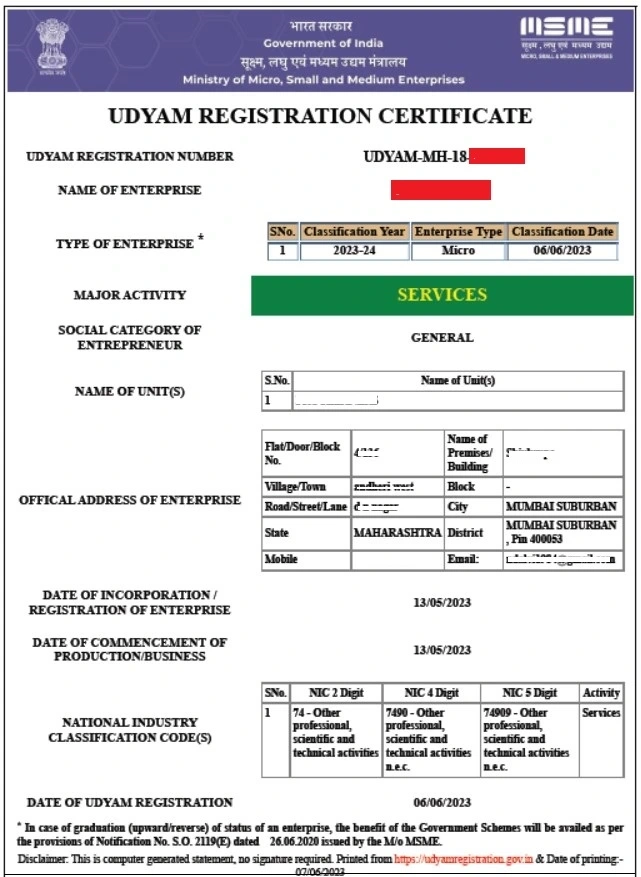
Suggested image alt text:
Sample Udyam Registration Certificate showing the enterprise registration number and certificate layout
A Udyam Registration Certificate commonly displays information such as:
Do not publish an unredacted certificate belonging to a real customer. Hide the Aadhaar number, PAN, address, contact details, QR code, and other private information before using a sample image.
What If You Changed Your Mobile Number?
If you changed your mobile number but still have access to the registered email address, select email as the OTP option.
If the registered email is unavailable but the original mobile number still works, select mobile verification.
If you cannot access either the registered mobile number or the registered email address:
Changing the mobile number in Aadhaar does not necessarily update the contact details in an existing Udyam application automatically.
What If You Have Forgotten Both the Email and Mobile Number?
Search the following places before contacting support:
Search for terms such as:
If nothing is found and neither contact method is accessible, contact an official MSME support channel. Avoid relying on an unverified private helpline number copied from a third-party website.
Prevent Losing Your Udyam Number Again
A forgotten URN often becomes urgent just before a loan deadline, tender submission, vendor registration, or compliance requirement. The following habits can prevent the same problem from happening again.
Save the certificate in two cloud locations
Store the certificate PDF in at least two independent places. A practical combination is:
Do not depend entirely on one mobile phone or laptop. Devices can be lost, damaged, replaced, or affected by storage failure.
Print two physical copies
Keep printed copies in different secure locations:
Physical copies may still be useful when preparing tender, loan, vendor, or departmental documentation.
Record the URN in three searchable places
Store the number in:
Use a searchable subject line such as:
Udyam URN – [Business Name]
This makes the number easier to find even when the certificate file is missing.
Keep the registered mobile number active
Do not allow the registered SIM to expire without first updating important business records. When switching operators or numbers, complete the relevant updates while the previous contact method is still available.
Also keep the registered email account active and ensure its recovery phone number is current.
Share the recovery path with a trusted person
An authorised accountant, company secretary, business partner, or senior team member should know:
Share access only with an authorised and trusted person. Do not circulate Aadhaar, PAN, OTPs, or login credentials unnecessarily.
Keep a basic compliance register
Maintain a simple record containing:
| Record | Details to save |
|---|---|
| Enterprise name | Exact registered name |
| Udyam number | Complete 19-character URN |
| Previous UAM number | Save if applicable |
| Registration date | Date shown on certificate |
| Registered mobile | Masked version for reference |
| Registered email | Current business email |
| Certificate location | Cloud folder and physical-file location |
| Authorised contact | Person responsible for compliance |
| Last review date | Date on which the details were checked |
Setting up this system takes only a few minutes and can prevent delays later.
Need Help Recovering Your URN, UAM, or Certificate?
Applicants who are unable to identify their registration type, locate the original contact information, or print the certificate may request professional guidance.
Support may be offered through:
Any support section should clearly state:
Frequently Asked Questions
Final Recovery Checklist
Final Thoughts
Recovering a forgotten Udyam Registration Number is often much simpler than most business owners expect. Losing your URN or UAM does not mean your MSME registration has been cancelled or that you need to register again. In most cases, if you can access your registered mobile number or email address, the official OTP verification process can help you retrieve the number within minutes.
Once recovered, save your Udyam details in multiple secure locations, download a copy of your certificate, and keep both digital and physical backups for future use. Most importantly, always complete OTP verification yourself and never share your OTP, Aadhaar authentication code, passwords, or banking PIN with anyone.
A few minutes spent securing your registration details today can save you from unnecessary stress when a loan application, tender submission, subsidy claim, or business compliance deadline becomes urgent.