Udyam Portal Registration 2026: Easy Complete Online Guide
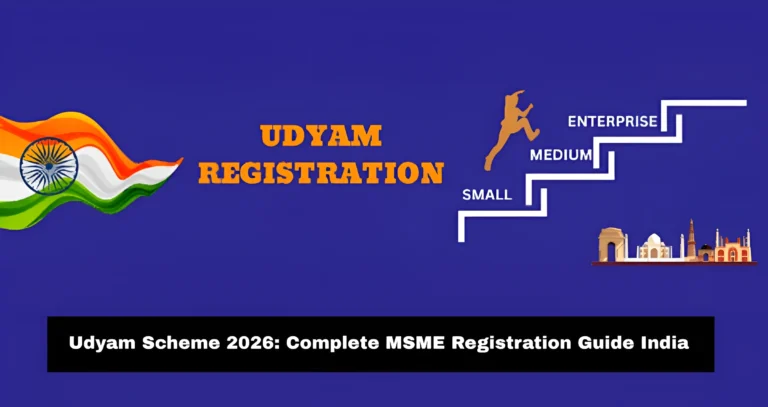
Udyam Portal Registration 2026 is the online process used by Indian business owners to register their business as an MSME. MSME means Micro, Small, and Medium Enterprise. This registration helps small business owners get an official Udyam Registration Number and an online certificate from the Ministry of MSME.
The good part is that the process is online, paperless, and free on the official government portal. The official Udyam website also clearly says that no private website, agency, or person is authorized to do MSME registration on behalf of the government. It also warns users about fake websites and states that Udyam registration is free of cost.
Many people search for Udyam registration because they want business recognition, bank loan support, government scheme benefits, tender access, or MSME certificate proof. This guide explains the full process in simple words, so you can understand what to do before applying.

What Is Udyam Portal Registration?
Udyam Portal Registration is the official MSME registration system in India. When a business completes registration, it gets a permanent Udyam Registration Number and an online Udyam Certificate. The certificate also has a dynamic QR code, which can be used to access business details on the portal. The official portal says there is no need for renewal after registration.
In simple words, Udyam registration is like an official identity for your small business. It tells banks, government departments, buyers, and other platforms that your business falls under the MSME category.
This registration can be useful for:
The main purpose is to help small businesses become part of the formal business system.
Who Can Apply for Udyam Registration in 2026?
Any eligible business that falls under micro, small, or medium enterprise limits can apply. The portal is open for manufacturing, service, and trading businesses.
You can apply if you run:
For proprietorship, the Aadhaar number of the proprietor is used. For partnership, the Aadhaar number of the managing partner is used. For HUF, the Aadhaar number of the karta is used. For companies, LLPs, societies, trusts, and similar bodies, the authorized signatory provides Aadhaar, along with PAN and GSTIN where applicable.
Latest MSME Classification Limits for 2026
Before applying, you should know which MSME category your business falls under. From 1 April 2025, the MSME classification limits were revised. The official portal now lists the updated limits for micro, small, and medium enterprises.
| MSME Category | Investment Limit | Turnover Limit |
|---|---|---|
| Micro Enterprise | Up to ₹2.5 crore | Up to ₹10 crore |
| Small Enterprise | Up to ₹25 crore | Up to ₹100 crore |
| Medium Enterprise | Up to ₹125 crore | Up to ₹500 crore |
This update is important for 2026 because many growing businesses may still qualify as MSMEs under the higher limits. The government notification also confirms that the older limits were replaced with higher investment and turnover limits from 1 April 2025.
Is Udyam Registration Free?
Yes, Udyam registration is free on the official government portal. You do not need to pay any fee to complete the registration.
This is one of the most important points because many private websites look similar to the official portal and may ask for payment. The official portal says registration is totally free and no cost or fee is to be paid to anyone.
So, always use the official website only.
Details Needed for Udyam Portal Registration
You do not need to upload physical documents on the official Udyam portal. The process is based on self-declaration. The portal says no documents or proof are required to be uploaded, and PAN and GST-linked details are taken automatically from government databases.
Still, keep these details ready before you start:
A simple tip: keep your PAN, Aadhaar, bank details, and business address in front of you before opening the form. This saves time and lowers the chance of mistakes.
How to Apply for Udyam Portal Registration Online in 2026
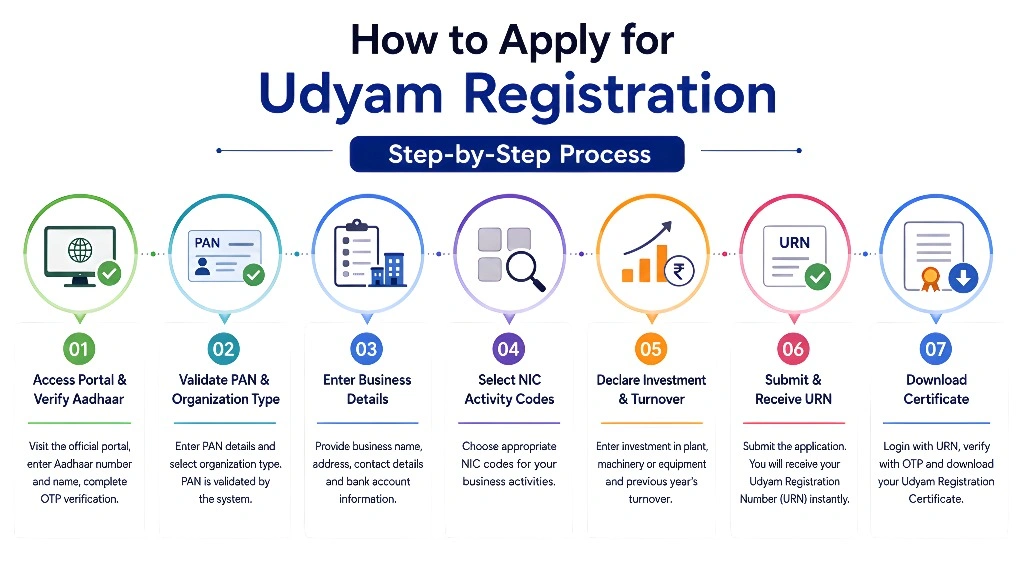
Here is the easy step-by-step process.
Visit the Official Udyam Portal
Go to the official Udyam Registration portal. On the home page, choose the option for new registration if your business is not already registered as an MSME. The official portal also has separate options for UAM migration and Udyam Assist Platform registration for informal micro enterprises.
Enter Aadhaar Details
The first part of the form is Aadhaar verification. You need to enter your Aadhaar number and the name of the entrepreneur as per Aadhaar. The registration form clearly says Aadhaar number is required for Udyam registration.
Make sure the name matches your Aadhaar card. Even a small spelling difference can create issues.
Verify Aadhaar
After entering Aadhaar details, you need to complete verification. Usually, this is done with OTP verification. Keep your Aadhaar-linked mobile number active and nearby.
If your mobile number is not linked with Aadhaar, you may face problems during verification. In that case, update your Aadhaar mobile number first.
Enter PAN Details
After Aadhaar verification, the portal asks for PAN verification. PAN is important because investment and turnover details are linked with government records. The official portal says PAN and GST-linked details are taken automatically from government databases.
For a proprietorship, the owner’s PAN is normally used. For a company, LLP, or other registered entity, use the business PAN as required..
Fill Basic Business Details
Now fill in the basic details of your business. This may include:
- Business name
- Type of organization
- Business start date
- Mobile number
- Email ID
- Social category
- Gender
- Special category, if any
Fill everything carefully. Your certificate will be based on the details you enter.
Add Business Address
Enter the official address of your business. If your business has more than one plant, shop, office, or unit, add the details correctly.
Use the same address you use for business records, bank accounts, GST, or official communication.
Add Bank Details
Enter your bank account number and IFSC code. Double-check the account number before submitting.
A wrong bank detail may create problems later when applying for schemes, loans, or other support.
Select Business Activity and NIC Code
You need to select whether your business is related to manufacturing, services, trading, or more than one activity.
You also need to choose the correct NIC code. NIC code means National Industrial Classification code. It tells the government what type of work your business does.
For example:
- A bakery may select a food-related code.
- A digital marketing agency may select an advertising or IT-related service code.
- A textile unit may select a textile manufacturing code.
- A trader may select a wholesale or retail activity code.
Choose the code that matches your main business activity. Do not select random codes.
Enter Investment and Turnover Details
You need to select whether your business is related to manufacturing, services, trading, or more than one activity.
The form may ask for investment and turnover information. For existing businesses, these details may be linked with ITR, PAN, and GST records. For new businesses, details may be based on self-declaration until records are available.
MSME classification is based on both investment and turnover. If a business crosses the limit in either investment or turnover, its category can move upward.
Submit the Form
Before submitting, check every detail again. Look at your Aadhaar name, PAN, business name, address, bank details, NIC code, and contact details.
Once you are satisfied, submit the form. After successful registration, the portal generates your Udyam Registration Number and online certificate.
How to Download Udyam Registration Certificate
After registration, you can download or print your Udyam Certificate from the official portal.
The Udyami login page also shows that users need the 19-digit Udyam Registration Number and the mobile number filled in the application for OTP-based login.
How to Verify Udyam Registration
You can also verify an Udyam Registration Number from the official portal. This is helpful when a bank, buyer, vendor, or government office wants to check whether the certificate is real.
Use the Print/Verify section on the portal and choose the verification option. Enter the required details and follow the steps shown on the screen.
Can You Update Udyam Registration Details?
Yes, Udyam details can be updated online. The official portal has an Update/Cancel Udyam Registration option. An enterprise with an Udyam Registration Number should update information online, including ITR and GST return details for the previous financial year, as required. Failure to update relevant information within the given period may lead to suspension of status.
So, do not ignore updates. If your turnover, investment, address, activity, or contact details change, update your registration.
Benefits of Udyam Registration
Udyam registration can help a business in many practical ways. It does not guarantee every benefit automatically, but it can make you eligible for MSME-related schemes and support.
Common benefits may include:

For many small businesses, the biggest benefit is simple: it gives the business an official MSME identity.
Common Mistakes to Avoid
Many applicants make small mistakes that can delay the process or create problems later. Avoid these:
The official portal clearly says no enterprise should file more than one Udyam Registration, but multiple manufacturing or service activities can be added under one registration.
Udyam Registration Tips for 2026
Here are some simple tips before you apply:
One more smart tip: take screenshots of each completed step before final submission. This helps if you need to check what you entered.
Udyam Registration vs Udyog Aadhaar
Earlier, many businesses used Udyog Aadhaar Memorandum, also called UAM. Now, Udyam Registration is the main MSME registration system. The official portal has a separate option for those already having Udyog Aadhaar Memorandum to migrate to Udyam.
If you already have old UAM registration, check the migration option instead of applying like a completely new business.
Udyam Registration for Informal Micro Enterprises
The Udyam portal also links to the Udyam Assist Platform, known as UAP, for Informal Micro Enterprises. This is useful for very small businesses that may not have full formal records yet. The main portal mentions UAP registration separately for Informal Micro Enterprises.
If your business is very small and informal, check whether UAP is a better route for you.
Frequently Asked Questions
Final Thoughts
Udyam Portal Registration 2026 is a simple and useful step for small business owners in India. It is online, free, and does not need document upload on the official portal. Once registered, your business gets an official MSME identity through the Udyam Registration Number and certificate.
The most important thing is to use only the official Udyam portal, enter correct details, and avoid paid or fake websites. Keep your Aadhaar, PAN, bank details, and business information ready before starting. If your business grows or your details change, update your Udyam registration on time.
For any small business owner who wants formal recognition and access to MSME-related support, Udyam registration is a smart first step.