Udyam Registration for LLP: Full Guide, Fees & Benefits 2026
Running a Limited Liability Partnership involves managing operating costs, delayed payments, funding needs, and growing competition. If your LLP falls within the current MSME investment and annual turnover limits, Udyam Registration can provide official MSME recognition and improve access to relevant government schemes, finance options, and business support programs.
Udyam Registration for LLP is completely free through the official government portal. The process is online, paperless, and generally requires the LLP’s PAN, applicable GST details, business information, and the Aadhaar of the authorised signatory. After successful registration, the LLP receives a permanent Udyam Registration Number and an electronic MSME certificate.
However, Udyam Registration does not automatically guarantee loans, subsidies, tax benefits, tenders, or lower interest rates. It creates official eligibility to apply for available benefits, while approval depends on the LLP’s business activity, financial profile, MSME category, and the specific conditions of each scheme.

What Is Udyam Registration for an LLP?
Udyam Registration is the Government of India’s official system for recognising micro, small, and medium enterprises.
When an eligible LLP completes the process, it receives:
Udyam Registration replaced the older Udyog Aadhaar system.
The process is integrated with PAN, Income Tax, and GST databases and does not require the applicant to upload a large set of physical documents.
Udyam Registration and LLP Registration Are Different
Do not confuse these two registrations.
LLP registration creates the legal business entity under the Limited Liability Partnership framework.
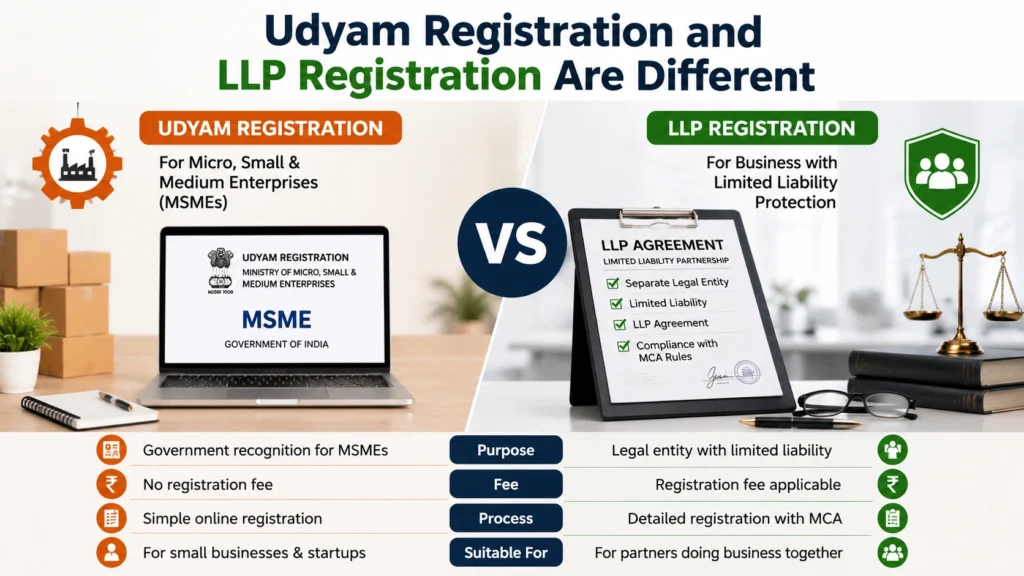
Udyam Registration gives an already formed or eligible prospective enterprise MSME recognition.
An Udyam Certificate does not replace:
Can an LLP Apply for Udyam Registration?
Yes. A Limited Liability Partnership is an accepted organisation type on the Udyam portal.
For an LLP application, the organisation or its authorised signatory must provide:
The authorised signatory’s Aadhaar-linked mobile number should be active because Aadhaar verification is completed through OTP.
MSME Classification Limits for LLPs in 2026
The MSME classification limits were revised with effect from 1 April 2025 and remain applicable in 2026.
| Enterprise category | Maximum investment in plant, machinery, or equipment | Maximum annual turnover |
|---|---|---|
| Micro enterprise | ₹2.5 crore | ₹10 crore |
| Small enterprise | ₹25 crore | ₹100 crore |
| Medium enterprise | ₹125 crore | ₹500 crore |
An LLP must stay within both the investment and turnover limits of the relevant category.
If it crosses one of the limits, its classification may move to a higher category.
Simple Examples
Is Udyam Registration Mandatory for an LLP?
Udyam Registration is generally optional for operating an LLP.
However, it becomes practically necessary when the LLP wants to apply for:
For many eligible small businesses, registration makes sense because the official filing is free and does not require annual renewal.
Documents and Details Required for LLP Udyam Registration
The process is described as paperless because documents are normally not uploaded.
Still, you should keep the correct records and information ready before starting the application.
Identity and Tax Details
- Aadhaar number of the LLP’s authorised signatory
- Name exactly as written on Aadhaar
- Aadhaar-linked mobile number
- PAN of the LLP
- GSTIN, if GST registration is applicable
- Email address
- Mobile number
LLP Details
- Legal name of the LLP
- LLPIN
- Date of incorporation
- Date on which business operations started
- Registered office address
- Address of each plant, branch, or operating unit
- Main business activity
Banking Details
- Bank name
- Bank account number
- IFSC code
Business Information
- Correct National Industrial Classification or NIC code
- Manufacturing, service, or trading activity
- Number of employees
- Investment in plant, machinery, or equipment
- Annual turnover
- Export turnover, where applicable
Useful tip: Check that the LLP’s name, PAN, GST details, and registered address match across government records. Even a small mismatch may cause verification problems.
How to Apply for Udyam Registration for LLP Online
Follow these steps carefully.
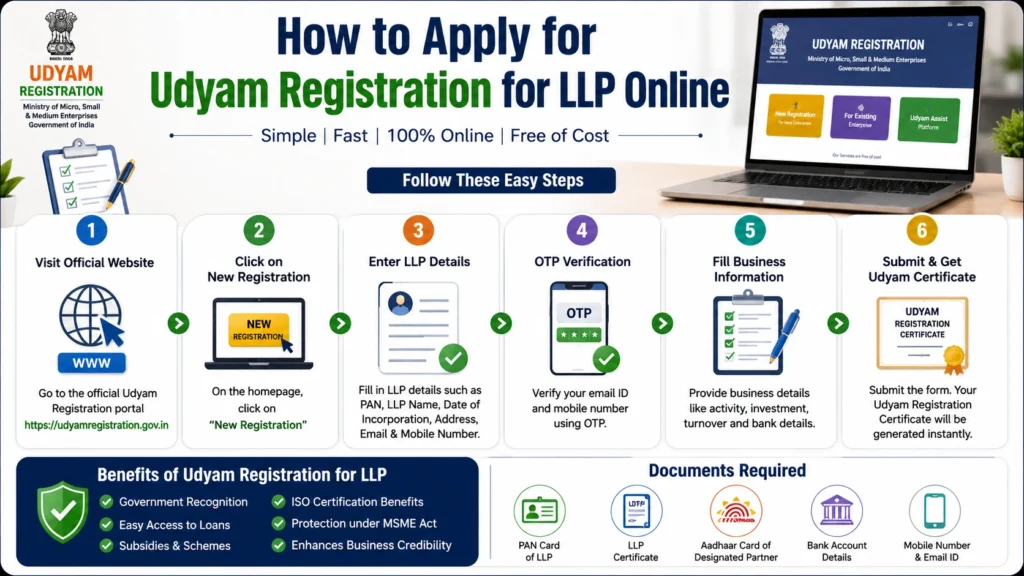
Step 1: Open the Official Udyam Portal
Step 2: Choose New Enterprise Registration
Select the option for new entrepreneurs or enterprises that are not yet registered as MSMEs.
Step 3: Verify the Authorised Signatory’s Aadhaar
Enter:
Request the OTP and complete Aadhaar verification.
For an LLP, the Aadhaar should belong to the person officially authorised to submit the application.
Step 4: Select LLP as the Organisation Type
Step 5: Verify the LLP’s PAN
Step 6: Enter GST Details
Step 7: Fill in the LLP’s Business Details
Enter the requested information, including:
Step 8: Select the Correct NIC Code
For example, an LLP offering software development and IT consulting may need separate activity codes for both services.
Step 9: Review Investment and Turnover Information
Step 10: Submit the Form Using Final OTP
Udyam Registration Fees for LLP in 2026
The government fee for Udyam Registration is:
₹0 — Completely Free
There is no application fee, certificate fee, or renewal fee on the official government portal.
A private consultant may charge for:
These are professional service charges, not government Udyam fees.
Validity and Renewal of an LLP Udyam Certificate
An Udyam Registration does not require regular renewal.
The registration number is permanent.
However, the enterprise’s classification may be updated according to its:
One enterprise should not obtain multiple Udyam registrations merely because it has several branches or activities.
Multiple units and activities can be added under one registration.
How to Check Udyam Registration Status and Download the Certificate
After submitting the Udyam application, the LLP can check its registration status through the official Udyam portal.
Keep the following information ready:
Once the registration is approved, the LLP can download or print its Udyam Registration Certificate online.
The certificate generally contains:
The certificate is issued electronically. A physical certificate is not normally sent by post.
Steps to Download the Udyam Certificate

Useful tip: Keep a digital copy of the certificate and Udyam Registration Number in the LLP’s compliance records. They may be required when applying for loans, tenders, MSME schemes, or delayed-payment support.
How to Update or Correct LLP Details in Udyam Registration
An LLP should keep its Udyam information correct and updated.
Changes in the following details may need to be updated:
Steps to Update Udyam Registration Details
Some information, such as turnover and investment, may be updated automatically through Income Tax and GST databases.
An LLP should not apply for a new Udyam Registration simply because its address, NIC code, or business activity has changed.
Existing details should normally be updated under the same registration number.
Important: If the LLP’s PAN, GSTIN, or legal name is incorrect in the original government records, correct those records first. Editing only the Udyam application may not solve the mismatch.
Main Benefits of Udyam Registration for LLP
The actual benefits depend on the LLP’s category, business activity, location, and the rules of each scheme.
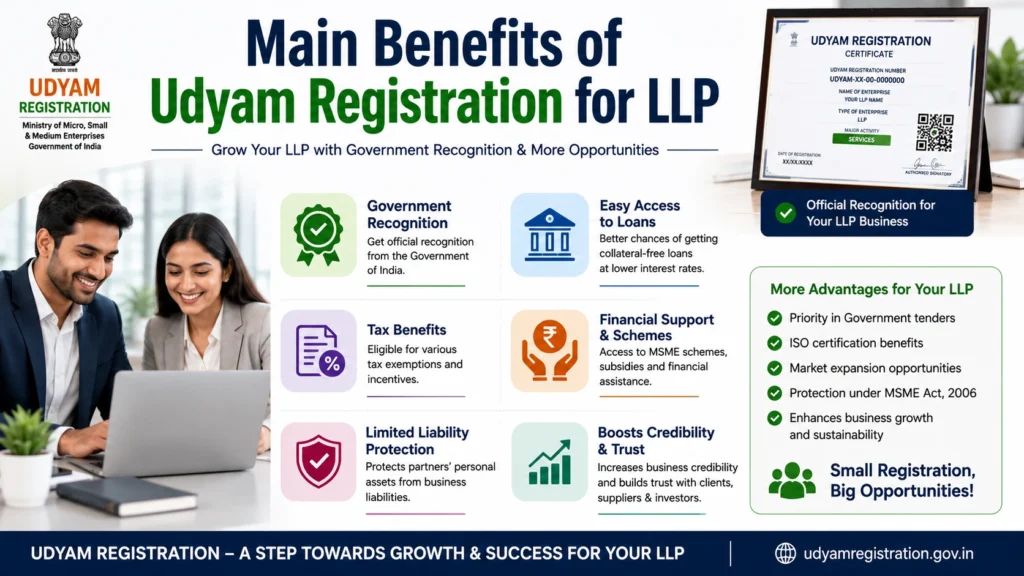
1. Official MSME Recognition
The Udyam Certificate provides formal proof that the LLP is registered as a micro, small, or medium enterprise.
This can be useful when dealing with:
2. Access to Credit-Guarantee Programmes
Eligible micro and small enterprises may apply through lenders for credit facilities covered under the Credit Guarantee Fund Trust for Micro and Small Enterprises.
Under current CGTMSE rules, eligible fund-based and non-fund-based facilities may receive guarantee cover, subject to:
A valid Udyam Registration Number is generally required for new applications.
This does not mean every Udyam-registered LLP automatically receives a collateral-free loan.
The bank or financial institution still checks:
3. Protection Against Delayed Payments
A qualifying micro or small enterprise supplying goods or services may receive protection under the MSMED Act’s delayed-payment provisions.
4. Opportunities in Government Procurement
The Central Government’s Public Procurement Policy includes procurement targets from micro and small enterprises for Central Ministries, Departments, and public-sector enterprises.
This can improve access to government markets, but Udyam Registration does not guarantee that an LLP will win a tender.
The business must still meet:
5. Eligibility for MSME Development Schemes
A valid Udyam Registration may allow an LLP to apply for programmes related to:
Each programme has separate eligibility conditions, subsidy limits, and application procedures.
6. Easier Identification for Priority-Sector Lending
7. Access to GeM and TReDS Options
Udyam-registered enterprises may show interest in platforms such as:
These options may support:
Special Rule for Wholesale and Retail Trading LLPs
A wholesale or retail trading LLP can register on the Udyam portal.
However, retail and wholesale trades are recognised as MSMEs mainly for the limited purpose of priority-sector lending.
They should not assume that delayed-payment protection, procurement preference, and every other MSME benefit automatically apply to them.
This distinction is often missing from online articles.
What Udyam Registration Does Not Guarantee
Be careful with websites that claim an Udyam Certificate automatically provides every financial benefit.
Registration alone does not guarantee:
Some of these benefits may be available under separate central or state schemes.
However, the LLP must meet the eligibility conditions and apply separately.
Common Mistakes to Avoid
Using a Private Website Without Checking
Some private portals look similar to the official government website and charge unnecessary fees.
Always confirm that you are using the official portal.
Selecting Partnership Instead of LLP
Choose Limited Liability Partnership as the organisation type.
Entering a Partner’s PAN
Use the LLP’s PAN, not the personal PAN of a partner.
Using an Unauthorised Aadhaar Holder
The Aadhaar should belong to the LLP’s authorised signatory.
Choosing an Incorrect NIC Code
A wrong NIC code may misrepresent the LLP’s activity and affect scheme eligibility.
Applying Separately for Every Branch
One enterprise should normally have one Udyam Registration.
Different units, branches, and activities can be included in the same registration.
Expecting Guaranteed Benefits
The certificate proves MSME status.
It does not override a bank’s lending policy or a scheme’s eligibility rules.
Entering Data That Does Not Match PAN, GST, or ITR Records
Review the following information before submission:
- Legal name
- Address
- Turnover
- Investment
- PAN
- GSTIN
- Bank details
Is Udyam Registration Worth It for an LLP?
For most eligible manufacturing and service LLPs, registration is worth completing.
It is free, does not require renewal, and can help the business establish its MSME status when applying for:
However, the certificate should be treated as a starting point, not a guaranteed benefits card.
The LLP must still apply separately and meet the conditions of each loan, subsidy, tender, or government programme.
Frequently Asked Questions
Final Thoughts
Udyam Registration for LLPs is a simple, free, and official way to gain MSME recognition in 2026. Before applying, make sure your LLP meets the latest investment and turnover limits, select “Limited Liability Partnership” as the organisation type, use the LLP’s PAN, and provide the Aadhaar details of the authorised signatory.
Always apply through the official Udyam portal and avoid agents who promise guaranteed loans, tax exemptions, subsidies, or government contracts. Udyam Registration only provides official MSME recognition and eligibility to apply for available benefits.
The actual advantages depend on your LLP’s business activity, MSME category, financial profile, and the specific rules of each government scheme.