How to Cancel Udyam Registration Online: Step-by-Step Guide
If you want to close your MSME record, the safest and most reliable method is to use the official Udyam portal. The Government of India clearly states that Udyam registration is free, paperless, and handled only through the official portal and approved single-window systems. The portal also warns users to stay away from private websites or agents claiming to offer official Udyam services.
Before learning how to cancel Udyam registration online, it’s important to understand when cancellation is appropriate. Typically, you may want to cancel your registration if the business has shut down, a registration was created by mistake, duplicate records exist, or your enterprise structure has changed making the old Udyam record unusable. If your business is still active, you may only need to update your details or reclassify your MSME category rather than cancel the registration entirely.
Why Updating May Be Better Than Cancelling
Before learning how to cancel Udyam registration online, it’s important to understand that Udyam registration is designed to be permanent, so there is no renewal required. However, the portal recommends updating financial-year information, such as investment, turnover, or exports, to maintain accurate MSME classification. If your business is still active, cancellation may not be the best option—updating your existing record is often a smarter move.
Additionally, a single enterprise should have only one Udyam registration, even if it operates multiple activities. In cases where duplicate registrations exist, knowing how to cancel Udyam registration online becomes essential to remove the extra record and maintain compliance.
Steps on How to Cancel Udyam Registration Online
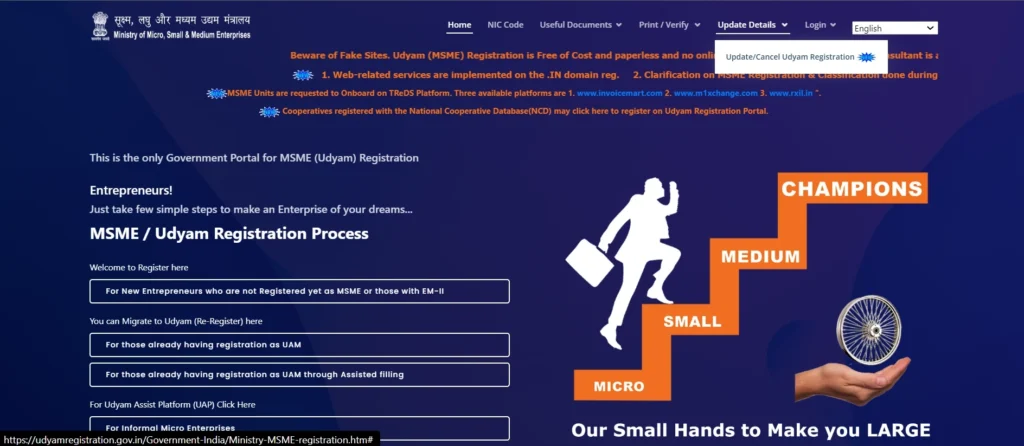
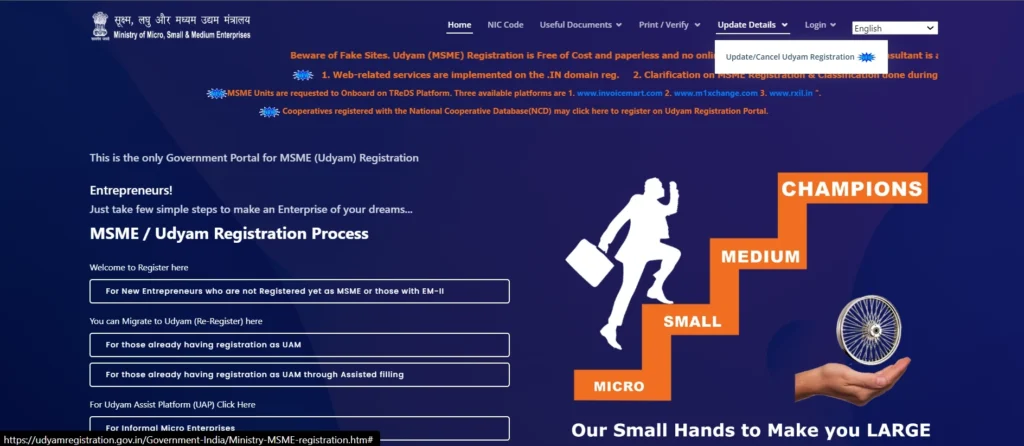
If you’re wondering how to cancel Udyam registration online, the process is quite simple once you have the correct login details. On the official portal, you start from the homepage, navigate to “Update Details,” and then select “Update/Cancel Udyam Registration.” From there, you’ll be redirected to the Udyami login page, where you can proceed with cancellation after OTP verification.
To log in, the official portal asks for your 19-digit Udyam Registration Number, your registered mobile number, and an OTP option. The login instructions on the government site say the Udyam number should follow the standard format UDYAM-XX-00-0000000, and the OTP can be sent either to the registered mobile number or the registered email, depending on what is available in your record.
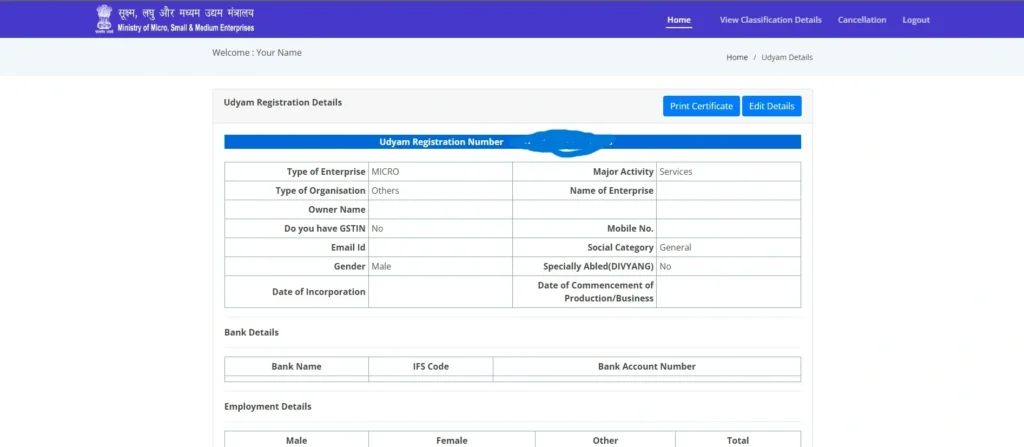
After login, current guides describing the live portal flow say users are taken to a dashboard where the Cancellation option appears. The next screen typically asks for the type of cancellation and the reason for cancellation, after which the user confirms the request by clicking the cancellation button. This same flow is described consistently across recent guides from major finance and business publishers, which supports the dashboard steps users usually see after OTP login.
The official online cancellation process is straightforward. Below is a detailed, step-by-step guide to help you cancel Udyam registration online correctly.
1. Open the Official Udyam Website
- Start with the official Udyam government portal only.
- The Udyam website is the only legitimate source for updates or cancellations.
- Avoid lookalike websites that charge fees for services meant to be free.
2. Navigate to “Update Details”
On the homepage, click the Update Details menu. This section contains the option Update/Cancel Udyam Registration, which is where you will manage your existing Udyam certificate.
3. Select “Update/Cancel Udyam Registration”
- On the homepage, navigate to the Update Details section at the top middle of the page.
- Click “Update/Cancel Udyam Registration” to manage or cancel your existing Udyam record easily.
4. Enter Your Udyam Registration Number
Input your Udyam Registration Number exactly as listed on your certificate. The official format is UDYAM-XX-00-0000000. Using an incorrect format or number is a common login issue.
5. Provide Your Registered Mobile Number
Enter the mobile number used during your original application. The OTP for login will be sent to this registered number or your email if available.
6. Choose OTP Delivery Mode
Select whether to receive the OTP on your registered mobile or email. This ensures secure login even if one contact method is inaccessible.
7. Click “Validate & Generate OTP”
Click Validate & Generate OTP to receive the OTP at your chosen contact point. Wait a few moments before requesting another OTP if it doesn’t arrive immediately.
8. Enter OTP and Login
Enter the OTP and click Validate OTP & Login. After verification, you will reach the dashboard where the cancellation option is available.
9. Access the “Cancellation” Section
In the dashboard, click on the Cancellation option to start the cancellation process.
10. Select the Type of Cancellation
Choose the appropriate type of cancellation, such as business closure, duplicate registration, or restructuring. This categorization ensures the portal records the reason correctly.
11. Provide a Reason for Cancellation
Clearly state the reason for cancellation. Example reasons include:
Fill Out the Udyam Cancellation Form
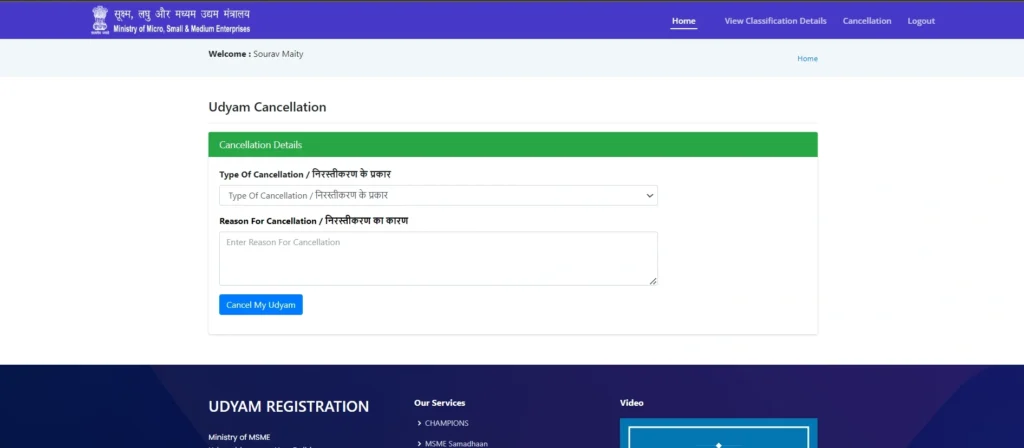
- A new cancellation form will appear.
- In the first field, select the “Type of Cancellation / निरस्तीकरण के प्रकार” that applies to your case.
- In the second field, clearly enter the “Reason for Cancellation / निरस्तीकरण का कारण” to explain why you want to cancel your Udyam registration.
12. Submit the Cancellation Request
Click Cancel My Udyam to submit your request. Once done, the portal will record your cancellation. Save a screenshot or acknowledgement for future reference.
13. Keep Proof of Cancellation
Maintain a record of your Udyam number, screenshots, the submitted reason, and any email confirmations. This helps in case you need to verify the cancellation later.
Common Issues When Cancelling Udyam Registration
Many users encounter issues not because the portal is difficult, but due to mismatched details. Common problems include:
If you forget your Udyam number, use the Forgot Udyam/UAM No. option on the portal. For classification issues, updating your details may be more appropriate than cancellation.
Frequently Asked Questions
Final Thoughts
How to Cancel Udyam Registration Online is simple when you follow the government’s official steps. Start from the Udyam portal, go to Update Details, select Update/Cancel Udyam Registration, log in with OTP, access the cancellation section, provide type and reason, and submit. Remember to use cancellation only for genuine closures or duplicate records, keep proof of your request, update records instead of cancelling if your business is still active, and always use the official portal to avoid fraud. Following these steps ensures a smooth and compliant cancellation of your MSME record.