How to Login to Udyam Without Registration Number Online
If you’re running a small or medium-sized enterprise (SME) and have registered under Udyam, you might have questions about how to login to Udyam without registration number. In this article, we’ll walk you through the process of logging into the Udyam portal even if you’ve forgotten or misplaced your Udyam Registration Number (URN). We’ll provide easy steps for two methods, ensuring that you can access your account hassle-free.

Understanding Udyam Registration
Before diving into the login process, it’s essential to understand Udyam Registration. This online process helps MSMEs (Micro, Small, and Medium Enterprises) access several government schemes, subsidies, and bank loans at reduced interest rates. The Udyam registration number plays a crucial role in verifying your identity on the portal, allowing businesses to access these benefits. If you’ve lost your Udyam Registration Number, there’s no need to worry – login to Udyam without registration number is easy to resolve!
Method 1: Retrieve Your Udyam Registration Number Online
If you’ve forgotten your Udyam Registration Number, the first thing you need to do is retrieve it. Follow these steps to regain access:
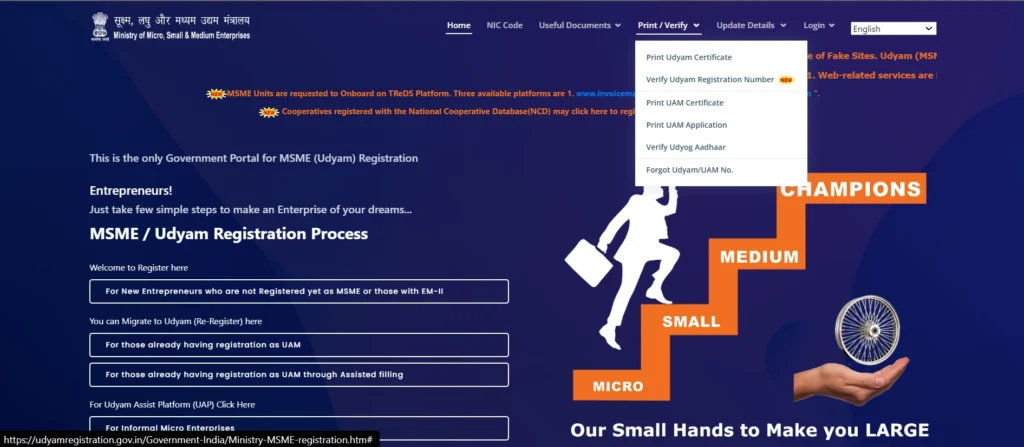
- Go to the Udyam Registration Portal:
Visit the official Udyam Registration Portal and select the “Print/Verify” option.
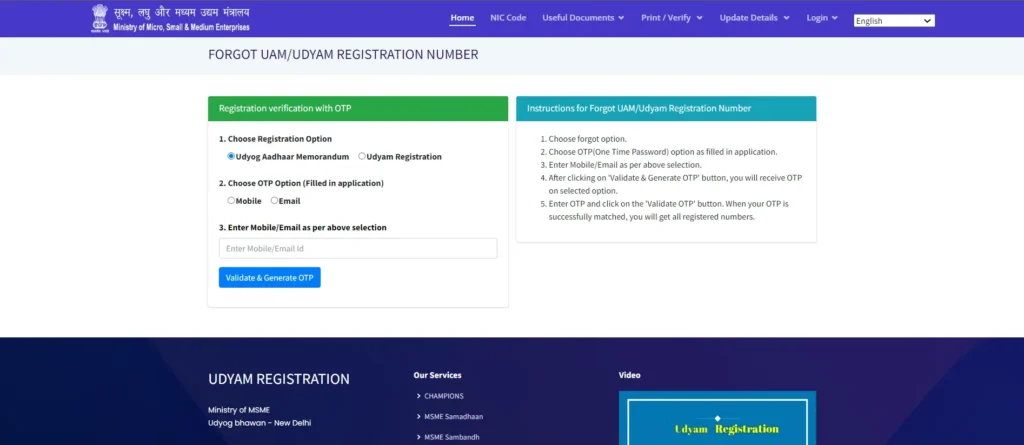
- Choose the ‘Forgot Udyam Number’ Option:
In the drop-down menu, select “Forgot Udyam/UAM Number.” - Select Your Registration Type:
Choose your registration type. If you previously registered under Udyog Aadhaar Memorandum (UAM), select the Udyog Aadhaar option. For Udyam registration, select “Udyam Registration.” - Select Your OTP Delivery Method:
Choose whether you want the OTP sent to your mobile number or email ID linked to your registration. - Enter Your Mobile Number or Email:
Enter the details in the provided fields and click “Validate and Generate OTP.”
- Enter the OTP:
After receiving the OTP, enter it quickly as it has a validity of only 10 minutes. Once entered, click “Validate OTP.” - Retrieve Your Udyam Registration Number:
After OTP validation, your Udyam Registration Number will be displayed on the screen. Be sure to save it for future reference.
Now that you’ve retrieved your Udyam Registration Number, you can easily login to Udyam without registration number using the steps below.
Method 2: Login Using Your Udyam Registration Number
After retrieving your Udyam Registration Number, follow these steps to login to Udyam without registration number:
- Go to the Udyam Registration Portal:
Visit the Udyam Registration Portal. - Click on the ‘Login’ Option:
On the homepage, click the “Login” option. - Choose the Udyami Login Option:
From the drop-down, select “Udyami Login.” - Enter Your Registered Mobile Number:
Type in the mobile number linked to your Udyam registration. - Select OTP Delivery Method:
Choose whether you’d like the OTP sent to your mobile number or email ID.
- Generate and Validate OTP:
Click “Validate and Generate OTP.” Once you receive the OTP, enter it and click “Validate OTP.”
- Access Your Udyam Dashboard:
After validating the OTP, you’ll be able to log into your Udyam account and manage your business details.
Method 3: Recover Udyam Registration Number for First-Time Users
If you’re a first-time user and have never registered before, you might be wondering how to access the portal without an existing registration number. Here’s how you can get started:
- Go to the Udyam Registration Portal:
Navigate to the Udyam Registration Portal. - Fill Out Basic Details:
On the homepage, click on “New Registration.” Fill in your business details, such as name, type, address, and PAN number. - Submit Your Application:
Once you’ve filled out all the details, submit the form for registration. After verification, you’ll receive your Udyam Registration Number via email or SMS. - Log In with Your New Registration Number:
After your registration is complete, you can use the new Udyam Registration Number to log into your account.
This method ensures that new businesses can get access to the portal even if they don’t have a previous registration number.
Troubleshooting Common Login Issues
If you encounter issues while trying to log into the Udyam portal, here are some troubleshooting tips:
Invalid OTP
Ensure that you enter the correct OTP and use the mobile number or email ID associated with your registration. The OTP expires after 10 minutes, so enter it quickly.
Incorrect Mobile Number or Email ID
Double-check that you’re using the mobile number or email ID registered with your Udyam account.
Server Issues
Sometimes, the portal may experience delays due to high traffic. Wait a few minutes and try again.
Registration Number Not Found
If you’re unable to retrieve your registration number, ensure you’re following the process correctly, or contact Udyam support for assistance.
Importance of Udyam Registration
Udyam registration is more than just a login credential. It provides numerous benefits to MSMEs, such as:
Udyam-registered businesses can avail themselves of government incentives, financial schemes, and subsidies.
Banks offer lower-interest loans to Udyam-registered businesses, helping them grow.
Businesses can access tax exemptions and other financial incentives.
The Udyam registration simplifies government processes, making it easier for businesses to access the support they need.
Frequently Asked Questions
Final Thoughts
In conclusion, login to Udyam without registration number is a straightforward process, and retrieving your registration number or logging in is quick and easy.
This registration is essential for MSMEs to gain access to government benefits, financial schemes, and tax exemptions. By following the steps provided above, you can quickly log in to your Udyam account and start availing of the services that will help your business grow.